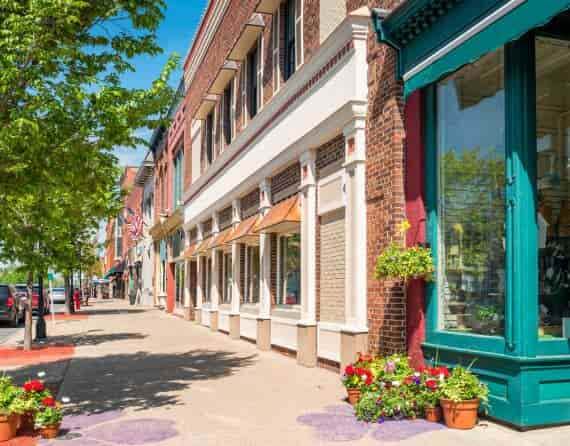
Some of the largest cities in the US; New York, Boston, San Francisco, and Chicago; all have something in common: smart streetscape design. It might not be something you commonly think about, but you and your neighborhood’s streetscape design interact often. The moment you pull out of your driveway or take your dog for a walk, you are taking advantage of your local streetscape. However, a streetscape is much more than the pavement under your feet.
What’s Streetscape?
When considering streetscape, it’s not only your road and sidewalk. A streetscape is a combination of everything visible from the street: lighting, buildings, architecture, greenery, and more. Everything around you contributes to the personality of your neighborhood and thus is part of the overall streetscape design.
What Does an Efficient Streetscape Design Do?
While no two streetscapes are the same, the best-designed ones all contribute to a neighborhood or subdivision in various ways. Civil engineers and landscape architects work together to help streetscape design achieve specific goals, such as:
Visually Appealing – Streetscapes often consider the surrounding architecture and make a design that visually compliments already existing structures. The choices in street design could be as simple as more shrubbery or as extensive as different road materials.
Safe – A smart streetscape design often ensures the safety of everyone. Wide lanes, buffers between the street and sidewalk, thoughtfully placed streetlights and more all contribute to the wellbeing of drivers and pedestrians alike.
Green – Greener incentives push to create a healthier environment for all those living in a neighborhood. Features like LED lighting for street lamps and stoplights contribute to energy-efficiency. Additionally, more vegetation helps to keep the air clean and your lungs healthy.
Accommodating – Above all, streetscape design must make it easy to navigate. Features like dual lanes, public transportation, bike lanes, crosswalks and more all make it simple to make it from place to place. A smart streetscape design not only accommodates cars but pedestrians as well.
Features of Excellent Streetscape Design
So, what makes up a streetscape you can admire? There are numerous features you might find part of a well-designed street, like:
Pedestrian Features – By creating more curb space, you allow for greater room for pedestrians to walk and interact. This is especially helpful for busy streets lined by businesses. Providing seating, waste disposal, greenery and more encourage people to visit these streetscapes.
Bus Access – Allowing for plenty of bus stops, with quick and easy access to businesses, is another great feature of proper streetscape design. Some streets will have dedicated bus lanes, extended curbs for bus stops and other features advantageous to public transport.
Speed Control – To minimize car accidents and keep pedestrian safe, streets may have various speed control features. Speed humps, speed cushions and traffic lights all contribute to preventing vehicles from speeding and walkers from getting in harm’s way.
Stormwater Management – Keeping rain and storms from impeding travel is another vital aspect of streetscape design. Stormwater management, such as bioswales, flow-through planters and permeable pavement all help keep water flowing away. Also, they integrate water back into the ecosystem cleanly and efficiently.
While these are a few of the main features that contribute to a smart streetscape design, there are plenty of other aspects that add to the health, safety and convenience of your neighborhood’s streets.
The Streetscape Experts
Creating a proper streetscape is no easy feat. However, Austin Engineering has an incredible amount of experience with various streetscape designs. Our civil engineers and landscape architects contribute to the streetscapes of cities throughout all Central Illinois. Moreover, our designs provide greener solutions and present a streetscape that both vehicles and pedestrians can share harmoniously.
To learn more about the work Austin Engineering has done, you can contact us at (309) 228-9552. Also, our Peoria office is located at 311 SW Water St, Ste 215, Peoria, IL 61602.
Cookie Consent
We use cookies to improve your experience on our site. By using our site, you consent to cookies.
Cookie Preferences
Manage your cookie preferences below:
Essential cookies enable basic functions and are necessary for the proper function of the website.
Name
Description
Duration
Cookie Preferences
This cookie is used to store the user's cookie consent preferences.
30 days
These cookies are needed for adding comments on this website.
Name
Description
Duration
comment_author
Used to track the user across multiple sessions.
Session
comment_author_email
Used to track the user across multiple sessions.
Session
comment_author_url
Used to track the user across multiple sessions.
Session
Google Tag Manager simplifies the management of marketing tags on your website without code changes.
Name
Description
Duration
cookiePreferences
Registers cookie preferences of a user
2 years
td
Registers statistical data on users' behaviour on the website. Used for internal analytics by the website operator.
session
Statistics cookies collect information anonymously. This information helps us understand how visitors use our website.
Google Analytics is a powerful tool that tracks and analyzes website traffic for informed marketing decisions.
ID used to identify users for 24 hours after last activity
24 hours
_gat
Used to monitor number of Google Analytics server requests when using Google Tag Manager
1 minute
_gac_
Contains information related to marketing campaigns of the user. These are shared with Google AdWords / Google Ads when the Google Ads and Google Analytics accounts are linked together.
90 days
__utma
ID used to identify users and sessions
2 years after last activity
__utmt
Used to monitor number of Google Analytics server requests
10 minutes
__utmb
Used to distinguish new sessions and visits. This cookie is set when the GA.js javascript library is loaded and there is no existing __utmb cookie. The cookie is updated every time data is sent to the Google Analytics server.
30 minutes after last activity
__utmc
Used only with old Urchin versions of Google Analytics and not with GA.js. Was used to distinguish between new sessions and visits at the end of a session.
End of session (browser)
__utmz
Contains information about the traffic source or campaign that directed user to the website. The cookie is set when the GA.js javascript is loaded and updated when data is sent to the Google Analytics server
6 months after last activity
__utmv
Contains custom information set by the web developer via the _setCustomVar method in Google Analytics. This cookie is updated every time new data is sent to the Google Analytics server.
2 years after last activity
__utmx
Used to determine whether a user is included in an A / B or Multivariate test.
18 months
_ga
ID used to identify users
2 years
_gali
Used by Google Analytics to determine which links on a page are being clicked
30 seconds
_ga_
ID used to identify users
2 years
Marketing cookies are used to follow visitors to websites. The intention is to show ads that are relevant and engaging to the individual user.
Facebook Pixel is a web analytics service that tracks and reports website traffic.
This cookie is set by X to identify and track the website visitor. Registers if a users is signed in the X platform and collects information about ad preferences.
2 years
personalization_id
Unique value with which users can be identified by X. Collected information is used to be personalize X services, including X trends, stories, ads and suggestions.
2 years
external_referer
Our Website uses X buttons to allow our visitors to follow our promotional X feeds, and sometimes embed feeds on our Website.
2 years
You can find more information in our Privacy Policy and .